---
url: /guide/advance/ability-compatible.md
---
# 原生能力兼容 {#native-ability-compatible}
## custom-tab-bar
Mpx 支持微信小程序原生自定义 tabbar ,关于自定义 tabbar 的详情请查看[这里](https://developers.weixin.qq.com/miniprogram/dev/framework/ability/custom-tabbar.html)
在 Mpx 中使用自定义 tabbar ,需要在 app.mpx 的 json 部分的 tabBar 配置里的 `custom` 为 true 。
```js
// app.mpx
```
在 src 目录下创建 custom-tab-bar 目录,包含 index.mpx 文件,可以在该 index.mpx 文件中编写自定义 tabbar 的模板、js、样式和 json 部分,同时也支持原生写法。
## workers
Mpx 完全支持小程序原生的 worker ,需要在 app.mpx 文件中的 json 部分声明 worker 的目录,Mpx 会将其对应目录进行打包,输出到目标代码目录中。
```js
```
更多详情可查看[这里](https://developers.weixin.qq.com/miniprogram/dev/framework/workers.html)
## 云开发 {#cloud-development}
Mpx 支持微信小程序提供的原生云开发能力。如果需要在项目中使用云开发的能力,可以通过 Mpx 脚手架工具在初始化项目时选择支持云开发。如果需要支持云开发能力,在项目初始化时需要选择是微信平台下,且不能支持跨平台开发。如下图所示:
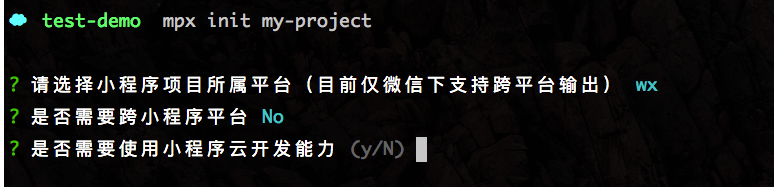
更多关于云开发相关可查看[这里](https://developers.weixin.qq.com/miniprogram/dev/wxcloud/basis/getting-started.html)
## useExtendedLib
Mpx 对于引入扩展库做了相关处理,可以在 app.mpx 中配置使用的扩展库,目前支持 weui 。
```html
```
还需要在 Mpx 的配置文件配置 `externals` 属性,来指定外部依赖,这样 Mpx 在进行打包时,会将其当做外部依赖进行打包。
```js
module.exports = {
// ...
externals: [ 'weui' ]
}
```